A Greasemonkey Christmas #
Update on 1/23/2006: The label colors script exposed a XSS vulnerability. It has now been updated to remove this hole - all users are encouraged to install the latest version of the script.
After many delays, I've finally gotten around to updating my Greasemonkey scripts so that they run under Firefox 1.5 and Greasemonkey 0.6.4. In fact, these scripts will most likely not work in older versions, and I will not be supporting Firefox 1.0.x or Greasemonkey 0.3.x.
Conversation Preview Bubbles (script) was the most straight-forward, since I had already done some work to make it compatible with the unreleased Greasemonkey 0.5.x releases. In fact, it seems to work better under FF 1.5/GM 0.6.4 - before the script did not trigger for label and search results views, but now it does. Saved Searches (script) required a bit more work, and in the process I decided to clean it up a bit. The result count functionality was removed, since it was not that useful. The fixed font toggle feature was spun off into a separate script since it didn't make any sense for it to be bundled.
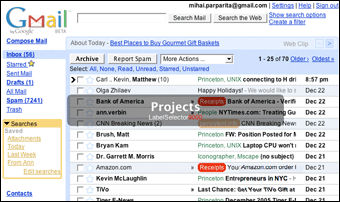 I'm also taking this opportunity to announce two scripts that I had previously written and never gotten around to releasing. Gmail Macros adds additional keyboard shortcuts to Gmail. Some are obvious (and have been done by other scripts) such as "t" for move to trash and "r" for mark as read. However, I strove to provide a bit more functionality. For example, "p" both marks a message as read and archives it, when you really don't want to read something (the "p" stands for "purge"). Additionally, the shortcuts can be easily customized by editing the
 HANDLERS_TABLE constant. More than one action can be chained together by providing a list of action codes (which are contained in the script and were extracted by looking at the generated "More Actions..." menu in Gmail). The other novel feature is for label operations. Pressing "g" brings up a Quicksilver-like display that allows you to begin typing in a label name to go to it (special names like "Inbox" and "Trash" work too). Similarly, pressing "l" allows you to label a conversation with the label of your choosing.
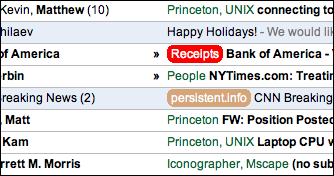 The other script is Gmail Label Colors. In the much-quoted Walt Mossberg article on Gmail and Yahoo Mail, he claims "Gmail doesn't allow folders, only color-coded labels." Ignoring the folders vs. labels debate for now, this sentence is not actually true, since labels in Gmail cannot be color-coded. This script adds that functionality, since it turns out to be very useful (if used sparingly, otherwise too many colors can get overwhelming). To specify a color, simply rename a label to "Labelname #color" (e.g. to make the label "Foo" be red, use "Foo #red" and to make the label "Bar" be orange-ish, use "Bar ##d52"). It works in a similar way to the conversation bubble script, in that it overrides the JavaScript function through which Gmail receives data. It has to jump through some hoops to avoid the HTML escaping that Gmail does; intrepid Greasemonkey hackers may want to look at the source.
If you're wondering why so many of my Greasemonkey scripts are Gmail-related, it's because it's the application where I spend a significant part of my day, thus every bit of productivity improvement counts. Not only do I use Gmail for my personal email, but I also use an internal version for my email needs at Google (as do most of the other Googlers - this constant dog-fooding helps to make Gmail a better product).
(the usual) Disclaimer: I happen to work for Google. These scripts were produced without any internal knowledge of Gmail, and they are not endorsed by Google in any way. If you have any problems with them, please contact only me.