Update on July 3: The reader_archive and feed_archive scripts are no longer operational, since Reader (and its API) has been shut down. Thanks to everyone that tried the script and gave feedback. For more discussion, see also Hacker News.
There remain only a few days until Google Reader shuts down. Besides the emotions1 and the practicalities of finding a replacement2, I've also been pondering the data loss aspects. As a bit of a digital pack rat, the idea of not being able to get at a large chunk of the information that I've consumed over the past seven and a half years seems very scary. Technically most of it is public data, and just a web search away. However, the items that I've read, tagged, starred, etc. represent a curated subset of that, and I don't see an easy of recovering those bits.
Reader has Takeout support, but it's incomplete. I've therefore built the reader_archive tool that dumps everything related to your account in Reader via the "API". This means every read item3, every tagged item, every comment, every like, every bundle, etc. There's also a companion site at readerisdead.com that explains how to use the tool, provides pointers to the archive format and collects related tools4.
Additionally, Reader is for better or worse the papersite of record for public feed content on the internet. Beyond my 545 subscriptions, there are millions of feeds whose histories are best preserved in Reader. Thankfully, ArchiveTeam has stepped up. I've also provided a feed_archive tool that lets you dump Reader's full history for feeds for your own use.5
I don't fault Google for providing only partial data via Takeout. Exporting all 612,599 read items in my account (and a few hundred thousand more from subscriptions, recommendations, etc.) results in almost 4 GB of data. Even if I'm in the 99th percentile for Reader users (I've got the badge to prove it), providing hundreds of megabytes of data per user would not be feasible. I'm actually happy that Takeout support happened at all, since my understanding is that it was all during 20% time. It's certainly better than other outcomes.
Of course, I've had 3 months to work on this tool, but per Parkinson's law, it's been a bit of a scramble over the past few days to get it all together. I'm now reasonably confident that the tool is getting everything it can. The biggest missing piece is a way to browse the extracted data. I've started on reader_browser, which exposes a web UI for an archive directory. I'm also hoping to write some more selective exporters (e.g. from tagged items to Evernote for Ann's tagged recipes). Help is appreciated.
I am of course saddened to see something that I spent 5 years working on get shut down. And yet, I'm excited to see renewed interest and activity in a field that had been thought fallow. Hopefully not having a a disinterested incumbent will be for the best.
Up to a limit of 300,000, imposed by Reader's backend.
If these command-line tools are too unfriendly, CloudPull is a nice-looking app that backs up subscriptions, tags and starred items.
Google's Feed API will continue to exist, and it's served by the same backend that served Google Reader. However it does not expose items beyond recent ones in the feed.
Based a lunch with Alan Green at Google on June 21, 2013. Posted on April 20, 2024, but backdated to the time that this was written in a private document.
The shutdown timing was mainly technical. There have been enough infrastructure changes that the Reader codebase has rotted, and it cannot be pushed to prod anymore. It sounded like there hadn't been any pushes for ~6 months. I'm pretty I pushed shortly before I left (October 2012), so it's a bit surprising that the code rotted that quickly.
The shutdown is mainly being handled by the SREs (Alan will actually be on vacation for the two weeks before July 1). It effectively sounded like they were going to be removing the GFE rules on July 1, and then take their time actually turning off any servers, since that actually involves understanding how things work and what depends on what. The FRBEs will definitely be running for a while longer, since there are other Google services that depend on them.
All of the feed data is going to be given to the Feeds team in Zurich (they also inherited the PubSubHubbub hub and maybe even the AJAX Feed API). They will hopefully archive it. Matt Cutts has been part of the cabal that has been trying to make the shutdown be handled as reasonably as possible.
He said politics didn't really factor into it. If it had been politics, the easiest thing would have been to do nothing, and let the service run as is idefinitely. Wipeout (Reader is not compliant, data for deleted Gaia accounts is still present) was a slight factor, but if that had been the only reason, it still would have been easier to let it keep running.
Once the shutdown decision was made, they needed to put someone's name on the blog posts (Google Blog, Reader Blog). Alan said he was OK with his name being on the Reader Blog, since he was the last engineer standing. However, it didn't make sense for this name (as a random engineer) to be on a Google Blog post that announced the shutting down of several services. It made more sense for a VP, or at least a director. PR asked several directors and VPs (including Alan Noble, the SYD site director), and they all begged off, saying that they had (external) people they were going to be meeting in the next couple of weeks, and if their name was on the blog post, they would just get a lot of hate about shutting down Reader. PR then asked Alan, and after thinking about it, he declined. PR thanked him for seriously considering it, and then went to Alan's manager and asked him to ask Alan. Alan declined again. PR asked his manager to ask him again, and Alan said he would only do it if they promoted him to director, and that was the last that he heard of it. Eventually Urs said he would be OK with putting his name on it. Alan seemed to have a pretty good opinion of Urs; that of all the VPs he was most willing to speak truthfully about Reader.
PR also gave Alan a document for posting to reader-discuss@ and internal Google+. It was apparently terrible, but he was at least allowed to rewrite it. In general it sounded like PR is now very involved in internal communications; Alan sounded rather cynical about that.
The blog post announcing the shutdown was done one day early. The idea was to take the opportunity of the new Pope being announced and Andy Rubin being replaced as head of Android, so that the Reader news may be drowned out. PR didn't apparently realize that the kinds of people that care about the other two events (especially the Pope) are not the same kind of people that care about Reader, so it didn't work.
This also screwed up the internal announcement plans. The idea had been to announce the management reshuffle on Tuesday, have a town hall about it Wednesday morning, and then announce the Reader shutdown on Wednesday afternoon, leaving TGIF (now on Thursdays) as the venue to discuss it. Since it all happened on Tuesday, the townhall ended up being dominated with Reader questions. They continued at TGIF, to the point where Sergey held up a microphone cable and said “If I bite down on this, will the pain stop?” Urs was the only VP who had decent answers to the Reader questions (Matt Cutts in particular spoke for a while defending Reader). About a month (?) later, there was a “bring your parent(s) to work day”, at which they held a special TGIF in Shoreline Amphitheatre. Parents were apparently encouraged to ask questions, and the first parent asked about the Reader shutdown, which elicited a lot of laughter from all the Googlers.
Image-based masking was first introduced by WebKit a few years ago, and has proven to be a useful CSS feature. Unfortunately browsers without a WebKit lineage do not support it, which makes it a less than appealing option for cross-browser development. There is however the alternative of SVG-based masking, introduced by Firefox/Gecko at least partly in response to WebKit's feature. My goal was to find some way to combine the two mechanisms, so that I could use the same image assets in both rendering engines to achieve the masking effect. My other requirement was that the masks had to be provided as raster images (WebKit can use SVG file as image masks, but some shapes are complex enough that representing it as a bitmap is preferable).
SVG supports an <image> element, so at first glance this would just be a matter of something like:
Unfortunately, depending on your mask image, when trying that, you will most likely end up with nothing being displayed. A more careful reading shows that WebKit's image masks only use the alpha channel to determine what gets masked, while SVG masks use the luminance. If your mask image has black in the RGB channels, then the luminance is 0, and nothing will show through.
SVG 2 introduces a mask-type="alpha" property that is meant to solve this very problem. Better yet, code to support this feature in Gecko landed 6 months ago. However, the feature is behind a layout.css.masking.enabledabout:config flag, so it's not actually useful.
After more exploration of what SVG can and can't do, it occurred to me that I could transform an alpha channel mask into a luminance mask entirely within SVG (I had initially experimented with using <canvas>, but that would have meant that masks would not be ready until scripts had executed). Specifically, SVG Filters can be used to alter SVG images, including masks. The feColorMatrix filter can be used to manipulate color channel data, and thus a simple matrix can be used to copy the alpha channel over to the RGB channels. Putting all that together gives us:
I've put up a small demo of this in action (a silhouette of the continents is used to mask various textures). It seems to work as expected in Chrome, Safari 6, and Firefox 21.
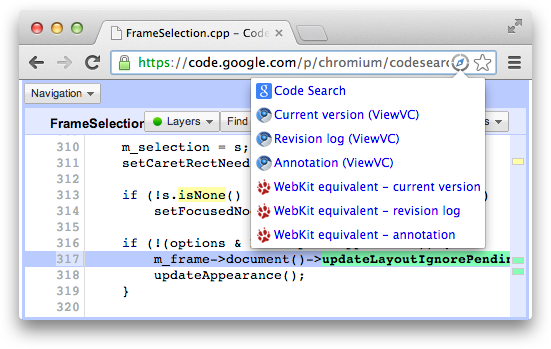
It occurred to me that I never blogged about my Source Quicklinks
extension (source). I created it back in 2010, when I started working on the Chrome team, focusing on the WebKit side of things. I was spending a lot of time in Code Search trying to understand how things worked. Chromium's code search instance searches not just the Chromium repository itself, but also all its dependencies (WebKit, V8, Skia, etc.). A lot of times the only way to understand a piece of code was to look at the commit that added it (especially in WebKit code, where comments are scarce but the bug associated with the commit often provides the back story). I was therefore doing a lot of URL mangling to go from Code Search results to Trac pages that had "blame" (annotation) views.
The extension made this process easier, adding a page action that provides back and forth links between Code Search, the Chromium repository (both the ViewVC and the Gitweb sites), WebKit's Trac setup and V8. Later, when the omnibox API became available, it also gained a "sql" search shortcut for the Chromium repository and commits.
Though I no longer work on Chrome, I still find myself going through those code bases quite often. For example, the best way to know whether something triggers layout in Blink/WebKit is by reading the code. I've therefore revved the extension to handle the Blink fork, in addition to cleaning up some other things that had started to bitrot. I also attempted to add cross-links between the WebKit and Blink repositories that takes into account the Blink reorganization, though we'll see how useful that ends up being as the codebases diverge more and more.
If Google Reader were a movie or TV show, at the end of the spectacle the credits would roll and you would get to see who was responsible for what you just saw. But in today's age, software "about box credits" are no longer common.
I thought it might be nice, for the sake of posterity, to list all those who worked on Reader over the years. There's been a lot of discussion about Reader's imminent shutdown, but most of it focused on Google (the corporate entity) and its strategy. However, at the end of the day, Reader was built by people. I and a few others have been lucky enough to be more visible, but everyone involved deserves credit and thanks. This is especially the case since as Chris and Brian have described, Reader faced quite a few internal struggles. As I remember it, nearly everyone on the Reader team explicitly requested to join it, and often had to fight to keep their role.
Coming up with this list was difficult, both technically (can you name all your coworkers going back 8 years?), and because it was tough to decide where to draw the line. Google is a big company, and many people in many supporting roles helped to Reader out. First, here's a list of all full-time Reader team members:
Ye Zhou (2009-2010): Software Engineer, still at Google.
Devin Kennedy (summer of 2009): Software Engineer Intern, still at Google.
Arif Siddiquee (2009-2011): Software Engineer, still at Google.
Alan Green (2011-2012): Software Engineer, still at Google.
Mick Hollins (2011-2012): Software Engineer, still at Google.
Additionally, here's others who contributed to Reader in various roles at Google:
Design: Micheal Lopez
Executives: Greg Badros, Jeff Huber, Pavni Diwanji
Legal: Halimah DeLaine
Localization: Gabriella Laszlo, John Saito, Katsuhiko Momoi, Sasan Banava
PR: Nate Tyler, Oscar Shine, Sonya Boralv
Product Management: Bruce Polderman, Sabrina Ellis
Product Marketing: Kevin Systrom, Louis Gray, Peter Harbison, Robby Stein, Tom Stocky, Zach Yeskel
Quality Assurance: Amar Amte, Jan Carpenter, Kavitha Venkatesan, Madhuri Kulkarni, Thanh Le
Site Reliability Engineering: Chen Wang, Christoph Pfisterer, David Parrish, Ed Bardsley, Eric Weigle, Gary Luo, Huaxia Xia, James Long, Jerry Zhiwei Cen, Keith Brady, Lantian Zheng, Liren Chen, Matthew Eastman, Nadav Samet, Niall Sheridan, Olivier Beyssac, Patrick Scott, Paul Chien, Pereira Braga, Petru Paler, Sara Smollett, Scott Lamb, Sebastian Adamczyk, Vladimir Filipović, Wensheng Wang, Yu Liao
20% time and additional engineering: Aaron Boodman, Abdulla Kamar, Akshay Patil, Aman Bhargava, Brad Fitzpatrick, Brett Bavar, Brett Slatkin, Charles Chen, Ed Ho, John Pongsajapan, Olga Stroilova,
Peter Baldwin, Steve Jenson, Steve Lacey, T.V. Raman, Wiktor Gworek
User Experience Designers: Jonathan Terleski, Sean McBride
User Experience Research: Anna Avrekh, David Choi, Nika Smith, Theresa Sobczak
User Support: Graham Waldon, Paul Wilcox, Wen-Ai Yu
I'm sure I'm missing names and got things wrong, so don't hesitate to contact me with corrections. And to everyone that I worked with on Reader, it was a pleasure!
A few months ago, as I was making yet another test app to demonstrate a Chrome packaged app API, I wished for a REPL. In theory the Chrome Dev Tools would fit the bill, since the console lets you run arbitrary JavaScript statements. However, using the dev tools would still involve making a manifest with the right permissions and loading an unpacked app, and at least a background page if not an actual window to inspect. Once you inspected the right page, invoking and inspecting the results of asynchronous APIs would be tedious, with a lot of boilerplate to type every time.
I started to think about creating a purpose-built REPL for Chrome apps APIs. A generic REPL seemed out of the question, due to eval being disallowed due to the strict Content Security Policy used by apps. My initial thought involved a dropdown listing all functions in the chrome.* namespace and a way to invoke them with canned values (eval may be disallowed, but dynamic invocation of the form chrome[namespace][methodName](arg) is still possible). However, that seemed clunky, and wouldn't help with APIs like the socket one that need to chain several method calls with the parameters for one depending on the results of another.
I then thought more about the eval limitation, and if I could use sandboxed pages to create the REPL environment. In some ways that seemed contradictory; the whole point of sandboxed pages is that they don't have access to Chrome APIs (unlike the main frame/page). In exchange they can use less safe mechanisms such as eval (a form of privilege separation). However, sandboxed pages can communicate with the containing page and get data from them via postMessage1. In theory the input code could be eval-ed in the sandboxed frame, and when it tried to invoke Chrome APIs, the sandboxed frame would postMessage to the main frame, ask it to run that API method, get the result, and plug it back in the expression that was being evaluated.2
This plan hinged on fact that nearly all Chrome apps APIs are asynchronous already, thus it should be possible to create seemingly functionally identical proxies in the sandboxed frame. That way, as far as the user is concerned, they're running the original API methods directly. There would need to be some additional bookkeeping to make callback parameters work, but there was no technical barrier anymore.
Before talking about that bookkeeping, since we're now five paragraphs into the blog post, I should cut to the chase and give you a link to the REPL app that I ended up building: App APIs REPL
(source). And if you'd like to see it in action, here's a screencast of it showing basic JavaScript expression evaluation and then a more complex example playing around with the socket API to mimic HTTP requests to www.google.com.
Here's how eval-ing the following statement works:
The main frame (also referred to as the "host" in the source code) gets the input and sends it to the sandboxed frame via a EVAL message. The sandbox dutifully evals it.
chrome.socket.create is a stub that was created in the sandboxed frame: at application startup, the main frame walks over the chrome.* namespace and gathers all properties into a map and sends them to the sandbox (via a INIT_APIS message). The sandbox re-creates them, and for function properties and events a stub is generated.
When the stub is invoked, it sends a RUN_API_FUNCTION message to the main frame with the API method (chrome.socket.create in this case) that should be run and its parameters. Most parameters can be copied directly via the structured clone algorithm that is used by postMessage.
However, the second parameter is function that cannot be copied. Instead we generate an ID for it, put it in a pending callbacks map, and send the ID in its place.
On the main frame side, the list of parameters is reconstructed. For function parameters, we generate a stub based on the ID that was passed in. Once we have the parameters, we invoke the API function (via dynamic invocation, see above) with them.
When the stub function that was used as the callback parameter is invoked, it takes its arguments (if any), serializes them and then sends them and its function ID back to the sandboxed frame via a RUN_API_FUNCTION_CALLBACK message.
The sandboxed frame looks up the function ID in the callbacks map, deserializes the parameters, and then invokes the function with them.
The callback function uses the log() built-in function. That ends up sending a LOG message to the main frame with the data that it wants logged to the console.
Events work in a similar manner, with stubs being generated for add/removeListener() in the sandbox that end up adding/removing listeners in the main frame. There are two maps of listener functions, one in the sandboxed frame from ID to real listener, and one in the main frame from ID to stub/forwarding listener. This allows removing of listeners to work as expected.
The console functionality of the REPL is provided by jqconsole, which proved to the very easy to drop in and hook up input and output to. History of the console is persisted across app restarts via the storage API. Additional built-in commands like help and methods (which dumps a list of all available API methods) as implemented as custom getters getters in the global JavaScript namespace of the sandboxed frame. There's also a magic _ placeholder that can be used as a callback parameter or event listener; it will be replaced with a generated function that logs invocations.
In addition to being a useful developer and leaning tool, I hope that this REPL also helps with thinking with a sandboxed mindset. I know that the Content Security Policy that's used in apps has been controversial, with some taking it better than others. However, I think that privilege separation, declarative permissions, tying capabilities to user gestures/intent and other security features of the Chrome apps runtime are here to stay. CSP is applicable to the web in general, not just apps. Windows 8 requires sandboxing for store apps and its web-based apps are taking an approach similar to CSP to deter XSS. Sandboxing was one of the main themes for Mac desktop developers this year, with Apple finally pulling the trigger on sandbox requirements. Developers of large, complex applications were able to adapt them to the Mac OS X sandbox. That gives me hope that the Chrome app sandbox will not prevent real apps from being created. It's is starting with the even more restrictive web platform sandbox and relaxing it slightly, but is generally aiming for the same spot as the Mac one.
I'm also hopeful that there will be improvements that make it even easier to write secure apps. For example, the privilege isolation provided by sandboxed pages was inspired by a USENIX presentation (the paper presupposed no browser modifications, the Chrome team just paved the cowpath).
pkg.js is a library that's cropped up recently for making such main/sandboxed frame communication easier.
Note that this not the desired pattern for communication between the main and sandboxed frames. Ideally messages that are passed between the two should be as high-level as possible, with application semantics, not low-level Chrome API semantics. For example, if your sandboxed frame does image processing, it shouldn't get to pick the image paths that it reads/writes from; instead it should be given (and return) a blob of image data; it's up to the main frame to decide where it gets that image data (by reading a path on disk, from the webcam, etc.). Otherwise if the code in the sandbox is malicious, it could abuse the file I/O capability.
Snapchat's (and now Facebook Poke's) main claim to fame is that it lets you send "self-destructing" image messages. Setting aside the debate about the uses of this beyond sexting, the key vulnerability in both apps is the built-in ability to take screenshots. Both take a reactive approach, where you're notified if the recipient took a screenshot, but can't really do anything about it.
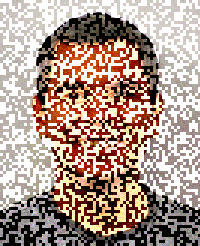
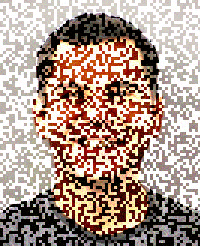
I was thinking about ways of mitigating this issue, and figured that perhaps turning the image into an animation where individual frames are not (or at least less) recognizable would be the right path. This is a variant of temporal dithering, except we're intentionally pretending like each frame has a limited amount of precision, and only when averaged together is the original image re-created.
I've created a proof of concept (source) of this. It loads the image into a <canvas> and generates a "positive" and "negative" frame out of it. The positive frame has a random offset added to each pixel's RGB components, while the negative one has it subtracted. When displayed in quick sequence (requestAnimationFrame is used to do this every time the screen refreshes) the two offsets should cancel out, and the resulting image should re-appear.
Source
Temporal dithering1
Positive frame
Negative frame
The resulting flicker is unfortunate, but perhaps that only enhances the furtiveness of an image that will disappear in a few seconds. It also seemed fitting to include Lenna as a source image, given its origin.
Obviously this technique is meant to deter only casual attempts at screen capture. Beyond the analog hole, screen recording software (albeit not an issue on non-jailbroken iOS devices) can easily reconstruct the original image.
Potential areas of exploration are doing the offsets in a different color space (RGB is not linear) and using more than two frames. One option for generating more frames is to keep making random positive and negative pairs. That way repeated screen captures are less likely to yield a pair that can be combined to reconstruct the original image. Another option for generating more frames is to create three or more images that need to be averaged together to yield the original. However, that will result in more image degradation, since the frames are less likely to be perceived as one image; persistence of vision lasts for 1/25th of a second, which is between 2 and 3 frames at 60Hz.
The embedded example in this blog post is rendered as an animated GIF. Due to clamping of GIF frame rates, lack of precision (the delay is specified as an integer counting hundredths of a second) and guessing at the screen's refresh rate (it assumes 60Hz), it will exhibit even more flicker than the programmatic version.