Sierra MCP Gateway Dev Diary #
Context is the lifeblood of internal agents - even the best model in the most full-featured harness will struggle to produce a better-than-mediocre result if it knows nothing about your company, team or project. Access to internal data was thus a crucial step in enabling Sierra employees to effectively use agents to get their jobs done. In parallel with building out the Pinecone internal agent system, this spring we also created a “gateway” service to allow safe and comprehensive access to the SaaS products and internal systems that Sierra runs on.
The gateway is built on top of the Model Context Protocol (MCP), the industry-accepted way of exposing systems to agents, giving them “tools” to read and act with. Released in late 2024 and exploding in popularity in 2025, MCP is a “mature” (some might say “boring”) technology by AI industry standards. One might thus assume that building an MCP gateway would be a straightforward project. However, it ended up having surprising depth, joining the flotilla of icebergs that Sierra has accumulated.
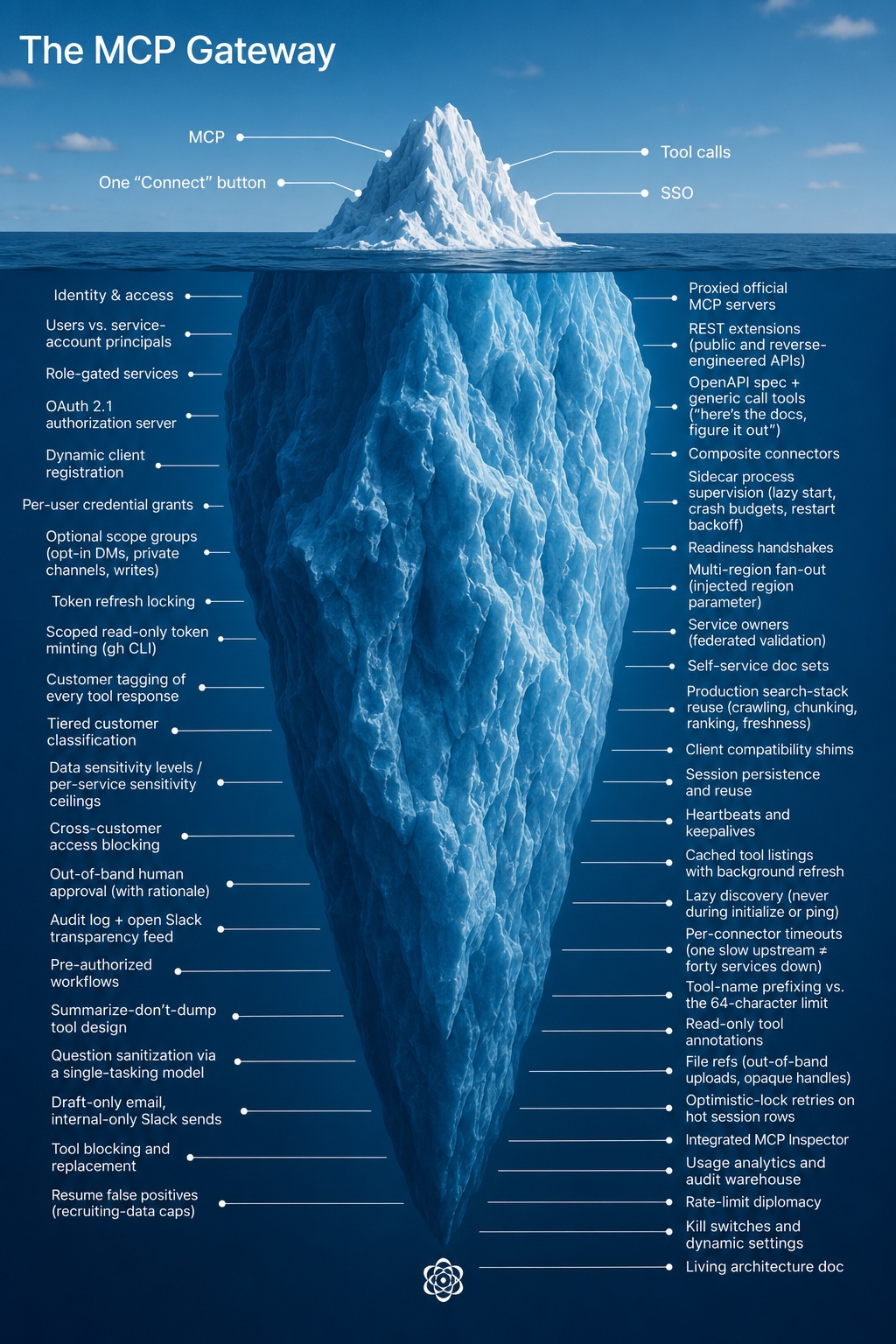
To convey the kinds of problems that needed to be solved and give a sense of AI-enabled development within Sierra, we thought it would be interesting to present a “development diary” of how the MCP gateway came to be. It captures the work of roughly one-and-a-half engineers who built the gateway, sometimes working full-time and at other times treating it as a background task.
Week 1
Services: 1 · Weekly users: 1 · Pinecone-authored commits: 0%
The AI acceleration team has the expression “grabbing the lock”, meaning roughly “I claim ownership of this area, please check with me first before doing something that might affect it.” With every individual engineer being that much more productive, it behooves us to avoid coordination overhead where possible. It also avoids the temptation of sending off a coding agent on a side-quest to implement an idea you might have had (in case that idea is at odds with the lock holder’s broader vision).
We thus grabbed the lock on the “connect agents to data” problem, both within the team and the company as a whole. By this point everyone at Sierra wanted their agents connected to something: sales to the CRM, recruiting to the applicant tracker, engineers to the data warehouse. While every team could wire up its own integrations (and invent its own permissioning and auditing system), it seemed preferable to solve this once and for all for everyone.
To host the service, we decided to use our existing internal administrative tooling platform, which gave us access to identity and permissioning for “free”. We also had familiarity with the mcp-go library, having already used it for other MCP-related functionality in the Sierra platform, so we continued to prefer that over the official SDK.
Though we had a much more full-featured system running locally, we wanted to get it deployed piecemeal. That way we could validate that it worked end-to-end, and also not overwhelm code reviewers with giant pull requests. The state at the end of the week was a gateway service that you could sign into, connect one service, and get access to just one tool: whoami, returning your identity and access level.
Week 2
Services: 6 · Weekly users: a few dozen, allowlisted · Pinecone-authored commits: 7%
We added the first real services this week: proxied access to Linear, Slack and GitHub, along with an internal tool allowing access to our data warehouse in ClickHouse. We also wanted to have “knowledge” tools to allow internal Sierra documents to be searched. While it was tempting to build something quick-and-dirty bespoke for our needs, we could see the fun of that initial experience being replaced by the toil of maintaining a reliable crawling, indexing and ranking system. Luckily Sierra has a whole team dedicated to that iceberg, and it ended up being much better in the long run to spend a bit of time figuring out how to reuse their system.
With the system now actually being useful, we wanted to validate that it would work for more than just the team. Following product management 101 principles, we found a few early adopters, enabled the service for them and set up a #mcp-gateway-users channel to communicate with them. It continues to this day, serving as the primary communication and feedback channel. While the most AI-pilled users will be constantly checking the gateway for new services and tools, most users still benefit from the occasional feature roundup post.
On the agentic development side, as we were fleshing out the system, we kept noticing that coding agents would solve problems at the wrong layer, or not be aware of key system properties. We ended up creating an mcp-gateway.md document to capture these invariants. Unlike traditional design docs or RFCs, it is a “living” document - all major tasks would ask the agent to refer to it and update it when completed. It was a constant battle to keep it high-level enough while still capturing important nuances; even the latest models love to over-explain. Serving as the “curators” for that document has at times felt like our most important contribution.
Giving coding agents a self-verification mechanism is key to having them successfully complete tasks with minimal intervention. This seemed straightforward for this project; after all, what could be more natural than “implement this tool, and then call it when you’re done to make sure it works.” However, we observed that agents love to “cheat” (not surprisingly). For example, given a broken authentication setup, the agent would helpfully read the correct token from the file system or local database and use it instead. At other times, if the MCP server behavior was not fully spec-compliant (and thus the built-in client would fail), the agent would fall back to manual HTTP requests via curl, but still declare success. We thus ended up using “consumer-grade” agents like ChatGPT or Claude for final validation or smoke tests. Their more limited capabilities would ensure they would only use the official functionality.
Week 3
Services: 6 · Weekly users: 12% of the company · Pinecone-authored commits: 10%
The main problem to be solved this week was “cross-customer” data access, or rather how to not allow it. Sierra’s customers entrust us with a lot of sensitive data, and our agent engineers help build many of our customers’ agents, thus they need access to it. A nightmare scenario: what if a coding agent acting on their behalf accesses one customer’s internal operating procedures and then “helpfully” copy/pastes them into another, to save time? While Sierra production systems are carefully partitioned by customer identity, the gateway also gives access to fuzzier sources of data, like Slack channels, internal documents, or ad-hoc analytics. Forbidding their use would negate the benefit of the gateway, so we wanted to find a way to do this safely.
We developed a “tagging” system that observes tool responses and associates them with a customer (if any) and a sensitivity level. It was intentionally designed to be generic; data may come from any system and may not have a well-formed schema. We build up a full audit log of data that was accessed about our customers, blocking attempts to access sensitive data about multiple ones in the same session. To do this efficiently, it is a multi-pass system:
- A deterministic phase builds a list of candidate customers the data may be about
- A fast model does an initial pass over those candidates to narrow them down
- A slower model does a final pass to determine the customer (if any) and the sensitivity of the data
Even with the final pass there are false positives. There may also be a legitimate business reason to look at data across customers, usually in specific departments or for special cases like incident investigations. We therefore allow users to approve this kind of “cross-customer” access, but it happens out-of-band, requires a deliberate user action, and also gets added to the audit log.
With that system in place, we had official sign off to launch the gateway to the entire company. As usage of it started to ramp up, we spent more time building out debugging tooling. While coding agents are happy to make sense of 50K of unformatted JSON or go through noisy logs, some gnarly problems still need a human to look at the data. The integrated MCP Inspector that we added to the gateway and the ability to inspect underlying data structures have saved us a lot of time.
Week 4
Services: 12 · Weekly users: 54% of the company · Pinecone-authored commits: 35%
As usage of the gateway picked up, we started to get a lot of feedback that some official MCP servers were insufficient for the workflows that our employees actually do every day. We thus developed a “REST extension” mechanism, allowing us to augment their tools using the public (or sometimes reverse-engineered) APIs that those services also expose. Conversely some tools provided by these servers were of no interest to us, or were deemed to be potentially dangerous, so we also added a way to block or replace them.
One of the other services that we added to the gateway was Pinecone itself, allowing its sessions to be listed, read, and created. This makes it possible to hand-off work from local coding agents to Pinecone or vice-versa. While the gateway is deeply integrated with Pinecone, it is a separate system and does not mandate its use, no strategy tax here. This kind of flexibility has allowed us to meet users where they are, and also be flexible as tooling evolves. For example, when Claude Design launched it was possible to give it access to real data from day one, instead of needing to wait for the equivalent functionality to be added to Pinecone.
Week 6
Services: 17 · Weekly users: 80% of the company · Pinecone-authored commits: 58%
The sales team within Sierra officially kicked off its “AI acceleration” effort, and the gateway plays a major part of that. This exposure to a new cohort of users brought new challenges. For example, they are much heavier users of email, and the tooling that we exposed through the gateway was pretty limited (turns out plain text email sending feels sufficient to engineers, but is a bit lacking in pizzazz to everyone else). Being responsive to their feedback (turning around feature requests within a few hours in some cases) was valuable in retaining those users.
Week 7
Services: 20 · Weekly users: 81% of the company · Pinecone-authored commits: 36%
At times development on the gateway reminds us of the early days of web development. Just as it was a guessing game as to whether the same HTML would work in both Netscape and Internet Explorer, we would struggle to get the full gateway capabilities working in Pinecone, local coding agents and hosted ones. We encountered divergent behavior in session reuse, heartbeat expectations, tool name validation, and other edge cases. Quality time spent in the MCP client and extension compatibility matrix pages also triggered flashbacks of caniuse.com. Luckily, it’s 2026 instead of 1996, and agents are very good at debugging all the flavors of OAuth, so it’s not a huge time sink, but it does feel like this iceberg at times.
Many of these investigations happened this week, explaining the drop in the percentage of Pinecone-authored commits. At this time, one of its limitations was that every agent had a “blank slate”, leading to a lot of toil to connect MCP services and recreate a realistic setup for every coding session. Shortly after this week Pinecone got a persisted “devstash” that allowed pre-configured data to be quickly loaded (and persisted if desired). This allowed gateway development to be more done through Pinecone, lowering the barrier to entry. The goal is to have a fully agentic loop: a user can send a “@Pinecone can you add a gateway tool to…” Slack message and then have it available to use a short while later.
Week 8
Services: 24 · Weekly users: 84% of the company · Pinecone-authored commits: 67%
This week we made a concerted effort to have the gateway more completely replace existing production investigation use cases. Those centered around tooling like Grafana and OpenSearch, which didn’t neatly map into our model - their MCP servers are meant to be self-hosted, and the surface area is broad enough that we didn’t want to vibe-code replacements to run as custom tools. Additionally, we need them to provide data for each cluster or region that Sierra runs in. We ended up giving up some of the architectural purity of the gateway, introducing two new subsystems:
- Sidecar services, requiring a local MCP server to be run as another process next to the gateway.
- Multi-region services, where we run multiple instances of each service, one per region.
While this did add operational complexity to the gateway, we hid it from clients - they’re not aware of the “sidecar” distinction, and regions manifest themselves as an injected region parameter to tools, instead of introducing a new concept.
The other use case that was discovered as part of this sweep was the need for “service accounts” - automations are increasingly agent-driven, and we want them to have their own identity instead of using a specific user’s. We generalized the gateway’s “user” concept into a “principal”, allowing both users and service accounts to get the same auditing and debugging capabilities.
Week 9
Services: 26 · Weekly users: 85% of the company · Pinecone-authored commits: 78%
MCP is not the answer to everything. For example, many workflows end up needing access to data from GitHub, and its full-featured MCP server was one of the first that we exposed through the gateway. However, it ended up being a somewhat awkward fit. Agents would spend a lot of time discovering its hundreds of tools, and large responses would bloat the context window.
As an alternative, agents are very familiar with the gh CLI, having encountered it a lot in their training. It also provides more efficient access to the same data – the output can be filtered or piped to a file for later processing. We had initially been wary of exposing the CLI to Pinecone sessions; we want all write or destructive operations to be tied to user intent and approval. We came upon the compromise of having Pinecone mint a separate GitHub token that only gives read-only access to specific repositories, and giving that to the agent to use when invoking the gh CLI. This lets it work with familiar tools, but in a safe way.
Week 11
Services: 32 · Weekly users: 88% of the company · Pinecone-authored commits: 69%
We got an influx of SaaS connection requests this week, and the operational overhead of setting up and making sure they work is getting to us. They are sometimes services that we don’t use ourselves, so even if we configure the connection, we don’t have a good way to validate that it works correctly end-to-end. We ended up introducing the concept of “service owners” - allowing us to federate out this task to folks who actually understand how they’re meant to be used.
Pinecone adoption within the company has also hit an inflection point where the self-service agentic loop that we wished for a while back is now happening more frequently. This week it was a whole service: Google Tasks. We had a power user who really wanted to have it accessible via the MCP gateway. Given their passion and subject matter expertise, their prompting for which tools to implement was a lot better than anything we could have done on the team.
Agentic development is also making it easier to iterate on tool design. For our candidate tracking system we ended up going through four separate implementations this week, since it took us a while to strike the right balance of tool count, flexibility and flexible permissions. With Pinecone writing most of the code, it didn’t feel too bad to throw it away and start from scratch.
Week 13
Services: 40 · Weekly users: 86% of the company · Pinecone-authored commits: 67%
While it’s great that users are contributing more and more services and tools to the gateway, there’s still value that we’re adding to make sure internal services are exposed in a safe manner. One heuristic we have is that the best way to make sure that an agent can’t do something unexpected with sensitive data is to avoid giving it that data in the first place.
This was exemplified by a request we got this week to allow querying of how journeys are used by our customers, to allow an analysis of common patterns. The straightforward approach would be to add a get_customer_journeys tool, allowing any agent direct access to the full content for any customer. The data would get “tagged” as being about that customer, but it seemed sensitive enough that we should have additional safeguards, or find an alternative if possible.
What we ended up adding instead was a get_customer_journey_summary tool, which an agent can use to get an overview of a journey. The gateway handles this one customer at a time, first validating that the summarization “question” is safe (it uses a separate, single-tasking model to rewrite the question in its own words, to ensure it is benign and not requesting sensitive details). We then return that summarized information to the calling agent, which can use it without ever having accessed the raw data.
Today
Services: 45 · Weekly users: 89% of the company
The gateway has become what we hoped: plumbing. The surface is still “visit one page, connect what you use”, with the iceberg underneath staying submerged unless you go looking. None of the individual pieces are exotic, it's the accumulation of a long tail of services and hopefully pragmatic decisions.
We like to think that part of the gateway’s success is due to our focus on actually going to the depths of that iceberg - unlike the usual 80/20 heuristic an automation tool that only covers 80% of a user’s needs rounds down to 0% - it needs to support the full workflow (or be end-user extensible), otherwise they won’t get most of the gains from it.
What has been more surprising has been how community-owned the gateway is: 33 people have contributed code. In July nearly two-thirds of commits came from outside the two of us who nominally own it, usually from someone prompting Pinecone to add the tool they needed. We’re now releasing the lock.
Post a Comment