Showing posts sorted by relevance for query clip2icns. Sort by date Show all posts

clip2icns pre-8.5 Hacking #

(argh, I've written this before, but I crashed, so I have to do it again)

Not much time for coding (big history rough draft was due, among other things). Major thing that happened was that I found (well, some users found, and they were registered so I had to pay attention) that clip2icns refused to work under pre 8.5 systems. It took me about a week to figure out why. The actual crash occured when I disposed of a PixMap in the Make1BitMask function. By selectively commenting out lines I had traced it to the call to CalcCMask (a system function). I beat my head against this for a few days, trying many things (including copying the source to a local PixMap, locking the source/target (again), taking out the customized color search function from CalcCMask, and other stuff). In the end I did a search at DejaNews (an archive of Usenet postings, including comp.sys.mac.programmer.*) and found my answer. It turns out that CalcCMask wants a real BitMap* for the target parameter. I was used to CopyBits, which also wants a BitMap*, but a casted PixMap* works too. Apparently this was changed in Mac OS 8.5, which is why I didn't happen while I was developing the function. And I didn't notice it before since I had used a different method of determining the mask (a much uglier one, which had been inhereted from clip2cicn, the first real (as in distributed) mac program I did, back in early June).

I also had to do a workaround, this time for a documented bug (which was fixed in Mac OS 8.5). Apparently calling CopyDeepMask when the target is a 8 bit (or less) GWorld will yield nothing in it. What I had to do was to use a temporary 32 bit GWorld which I then transferred to the 8 bit by using CopyBits. All of this went into clip2icns 1.5.1. Speaking of clip2icns, the number of registrations has topped 50, so I'm halfway to my (just established) goal of 100.

Be Thankful for Your Icons #

For some reason or other I didn't do a journal entry each day of the Thanksgiving holiday, so I'm gonna group all of them together like this...

Icon Mangler (Thursday & Friday):

Some progress, but now I'm stuck...

All of Thursday was spent trying to figure out how to do a text inside of a placard. I quickly realized that this wasn't possible, and the best way to fake it would be to use a static text field right over the placard. I added that, but for some reason the text was overwriting the placard underneath it, so it didn't look very seamless. I spent an hour fooling around with text modes, thinking that it was something to do with that (text modes let you do inverted text, text where the white space behind the letters is transparent, etc). It turned out that the Control Manager determines the drawing order by the relative positions and sizes of the controls. I had made my text field the same size as the placard, and the Control Manager interpreted that as the text field totally covering the placard (instead of showing the placard through the gaps in the letters). I made it a few pixels smaller, turned on the control hierarchy, made the static text a member of the placard, and everything worked.

The next day I was trying to improve the refereshing. First I focused on making the controls disable/enable properly when the application was put into the background. It turns out that this event isn't included in the activate event, so I had to add another event handler, the suspendResumeEvent. Then I went to improve the control drawing process. I got it so that it only used one region instead of two, and made it so that it refreshed properly when the window was in the background (before this I wasn't clipping, and the icon would get redrawn and overwrite stuff in the foreground). But then weird things have started to happen. I have to call Refresh() twice in the beginning in order to get the zoom display to draw properly. But event when I leave in one Refresh(), there's a problem with the initial drawing of an icon opened. It flashes on the screen for a split second, the the image well where it's supposed to be displayed goes white. If I cause the window to refresh again (by collapsing and expading the window, or by resizing it) then it draws properly. I wasn't able to figure out why this happened....

Glypher (Saturday and Sunday):

Many miscellaneous enhancemenets. First I redid my file open/saving routines, so that I don't have to write a new function for each file type that I want to save/open. Now I have two functions, NewFile and GetFile, which use the Navigation Services where possible (if the library is installed) and return a file spec for the file selected/created. I've added them to my commonfunctions.c set of functions, but I have to redo the rest of my programs to use them.

I've made is so that you can reposition the little badge on top of the icon by using the mouse or the arrow keys, in addition to using the buttons in the dialog. This isn't as easy as sounds, I ended up having to write an event filter for the dialog, so that it caught the key down events and processed them as necessary. Ironically a couple of days later I found this article in MacTech about the exact same thing, but I think that it was more meaningful to me because I figured it out myself (well, with the help of Inside Macintosh and the Macintosh C reference).

I've also started working towards the finalized version. Since I'm going to make this program free for clip2icns users, I've made it check at startup for the existence of a registered copy of clip2icns (by looking for a "clip2icns Preferences" file). If the file isn't there the icons that the program outputs have a little G in the corner, so that the user can get an idea of how the program works before actually registering. I've also done the about box, and it looks really cool (I just had to add an easter-egg for it now).

Ressurection #

This was the first program that I released publically, it's a simple tool to insert 'cicn' (color icon) resources into Kaleidoscope schemes (Kaleidoscope uses 'cicn's as its primary storage method, and the editor that ResEdit provides is limited (can't create icons with a size bigger than 64 x 64, can't import custom color tables) and broken (it thinks resources with a size above 32K are corrupted), so I made this free insertion tool (this is all happened in the beginning of the summer of 1998). Since then it had been pretty much left alone, since it seemed to cover everyone's needs, and as a freeware niche product it had no competition and I had no incentive to add features. After I had finished the initial work on Icon Mangler (as Iconographer was then known) I decided that it had fallen behind enough that it needed an upgrade (I had created a similar program, clip2icns, designed to insert and extract 32-bit icons, this one was shareware and did have competition so it was updated more often), so I merged the source code, so that it could have the UI-style that I had create for clip2icns. I had started on this in April, but got distracted after a few days, and forgot about the whole program until I got back from Stanford in August. Then someone asked me if I could fix a bug in it, and I realized that the new version that I had been working on had that fixed, so I finished it up and released it. I had thought that this would have been the end of it, especially since I gave the source code to some else who was working on a full Kaleidoscope editor.

Then last week someone contacted me about adding a feature (extracting 'cicn's to the clipboard, essentially the opposite of the current command which took the clipboard and put it in a 'cicn' resource). Considering that clip2icns already had a similar feature, and that Iconographer included full copy and paste support, I figured that I knew enough about the Scrap Manager (that's what's used to manage the clipboard) to do this. I opened up the clip2cicn CodeWarrior and its associated resource file, and added an Extract button to the dialog (this required a reorganization of the dialog layout, since it was getting rather wide) and then the relevant code so that it would beep when clicked (as a place holder for the eventual cicn2clip funnction). Then when I tried to compile and run it, I discovered that I got all these errors about functions that didn't exist in my commonFunctions.c shared file. Then I remembered that I had begun to convert my code to Carbon (which makes some structures, e.g. dialogs and controls), and so some of those functions didn't work with the standard Toolbox. In the end I had to create a special version of the Universal Headers (I have them precompiled so compile times are faster) with the Carbon flags turned off, and include that in clip2cicn. After this little hidrance, I implemented a basic version of the cicn2clip function. My main problem was that the resource contained a normal PixMap, but I couldn't use CopyBits with it, since the pointer to the pixel data was screwed up (when the PixMap is stored, the pointer becomes meaningless, since chances are very small that it'll be loaded in the exact same location in memory). I used the function PlotCIcon to draw it into a 32-bit GWorld, and the exported that to the clipboard. I sent off the new version to the user who had requested the feature, and he liked it, except that I wasn't extracting the custom color table. In the end I figured out how to fix the pixel data pointer (the 'cicn' handle included a part where the icon data was stored, so I set the pointer to the address of the resource plus the offset to the pixel data), and did a CopyBits straight from the icon into the picture I was putting in the clipboard, and that seems to work perfectly. Another user also asked me to fix/add some IDs in the pop-up menus I provide for the easy selection of the 'cicn' that should be inserted/extracted, so I did that too.

And now that I think about it the person I gave the source code to still hasn't done anything with it. I guess the moral of this long-winded, not-very-interesting story is that you should never throw any code away, or give up any project for dead.

clip2icns Reloaded #

Today I worked on redoing the interface for clip2icns. Until now the insertion dialog was modal, and after you inserted an icon it would get dismissed. So if you were trying to put more than a few icons into the same file it would get very annoying, since you had to keep choosing the file, and go to the proper ID in the menus. So I made the dialog movable (using the experience I gained from the Icon Browser in Icon Mangler), and made it so that the dialog would stay there until you clicked on the close button. Now when you want to insert more than one icon you can move switch back and forth, and not have to select the file every time, since the insertion dialog stays open. I also combined this dialog with the extraction one, since they shared 90% of the resources. Finally I added two more preference options, dithering (used when making the lower bit depths) can be turned on and off, and there is a setting to remember the last selected ID in the pop-up menu. Even though I added all these features, the source code is now 400 lines smaller (and I replaced the ugly macro that I was using for handling refreshes in the dialog with a much nicer function). I wish this could be done for all programs :p

And So It Begins... #

These are the programs I'm working on right now:

clip2icns: Tool to take an image from the clipboard and insert it into a 32 bit icon (complete with 8 bit mask). To be released as shareware ($10) when MacOS 8.5 comes out.
current status: almost complete, registration system done today, currently pondering pre 8.5 compatibility (would require writing of my own functions to replace the system ones)

badger: tool to generate system folders based on a badge (little 16x16 logo) and a base folder. Very useful for Kaleidoscope schemers, but limited applicability elsewhere.
current status: feature complete, currently investigating way to make system use the folder icons (as themes) without needing Kaleidoscope, thus further increasing it's usefulness.

nitro: code name for project to revamp my homepage (GUI Central) so that the entire site is generated from a database file. Done using CGI scripts written in Perl.
current status: basic concept implemented, currently converting items (350+) to new format

Icon Mangler: long term project to make an icon editor for the MacOS 8.5 32 bit icons.

current status: thinking about interface, using clip2icns and badger to familiarize myself with the new icon format.

Misc. Cleanup, Releases #

Didn't have much time to work during these days. I've been commenting the code, and fixing miscellaneous bugs. It turns out that when I had cleaned up the icnsClass code, I had made some mistakes, which I found while working on clip2icns, so I fixed those (I was attempting to generate the mask before I had put anything in the source GWorld). I've also gotten around to releasing clip2icns 1.5 and Glypher 1.0 to the public. Then I added a check for the proper system version (current 8.5+, but in the version that will released publically they will most likely be 8.0+, or even 7.x with the Appearance Manager installed. I'll also most likely be stripping out the 68K specific code (mostly AppleEvents stuff), since it'll just confuse the IB people. The commenting is progressing well, I'm done with the function headers, and now I have to do the actual code (nothing fancy, just cleaning possibly confusing sections).

Compression Weirdness #

clip2icns: Fixed a very weird crashing bug in clip2icns (the application itself wasn't crashing, but the finder was getting stuck once in a while while trying to display an icon). It was a compound problem in the compression routine, it was stopping too early (so the resource was too small) and it was interpreting and it had problems with compressing the last few pixels (it was interpreting them as a repeat area instead of copying them as is).

Register Me This #

clip2icns: Sent description of serial number algorithm to Kagi, so that they can generate the numbers for me automatically. The explanation wasn't that clear (I guess) so I had send sample output for each step later on. When it's all finished I'll "register" a copy of clip2icns to see if it all works right. Theoretically I should get all my money back (except for Kagi's fee, which is 6.5% plus the credit card processing fee).

Code Reuse: A Good Thing #

clip2icns/icns class: spent the day (well, evening) converting clip2icns to use the icns class. I've written two new functions for the class, ImportFromClipboard and SaveToFile, and used those to replace the core of c2i's core. Now it's much neater (down to 10 lines from 4 pages) and the code is reusable (as a matter of fact I'm using the ImportFromClipboard code in the dialog preview too, so I've removed some redundant code). This seems to prove that the class is scaling OK (it started as a simple display class) so adding editing capabilities to it shouldn't be that hard. However, I don't know how specific to make it for editing. In one extreme I could just add SetPixel and GetPixel functions, and write the actual editor as a program which makes calls to the class. In the other extreme I could embed everything in the class, and make each new editing window a new instance of it. But that's still a while away.

Archiving Mscape Software on GitHub #

Mscape SoftwareMscape Software was the “label” that I used in my late teenage years for Mac shareware programs. While having such a fake company was (is?) a surprisingly common thing, it turned into a pretty real side-gig during 1999 to 2003. I spent a lot of my hobby programming time working on Iconographer, an icon editor for the new-at-the-time 32-bit icns icon format introduced with MacOS 8.5 (and extended more with the initial release of Mac OS X). The early entries of this blog describe its initial development in pretty high detail — the deal that I had with my computer class teacher was that I wouldn’t have to do any of the normal coursework as long as I documented my progress.

All of that wound down as I was finishing up college, and I officially decommissioned the site in 2008. I’ve been on a bit of a retro-computing kick lately, partially inspired by listening to some of the oral histories compiled by the Computer History Museum, and I was reminded of this phase of my programming career. Over the years I’ve migrated everything to GitHub, which has turned it into an effective archive of everything open source that I’ve done (it also makes for some good RetroGit emails), but this earliest period was missing.

I didn’t actually use version control at the time, but I did save periodic snapshots of my entire development directories, usually tied to public releases of the program. It’s possible to backdate commits, and thus with the help of a script and some custom tooling to make Git understand resource forks I set about recreating the history. The biggest time sink was coming up with reasonable commit messages — nothing like puzzling over diffs from 23 years ago to understand what the intent was. Luckily by the later stages I had started to keep more detailed release notes, which helped a lot.

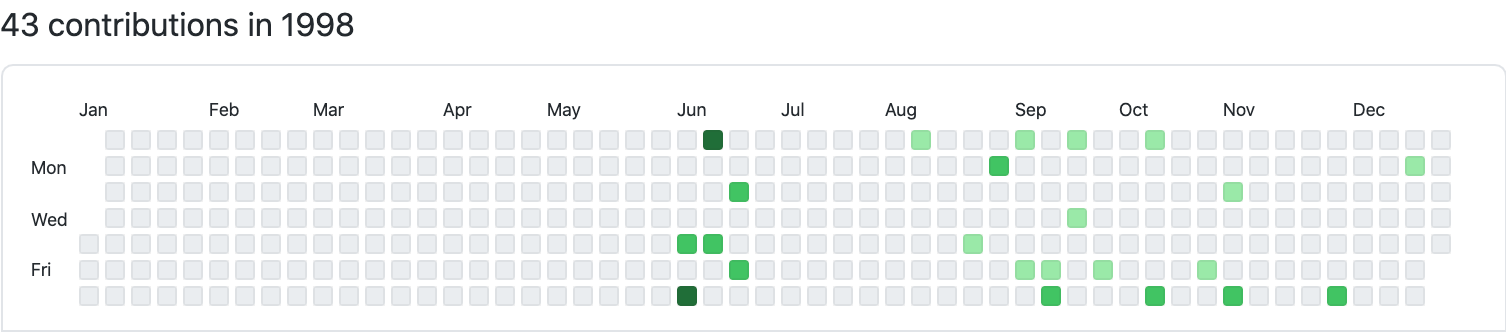
github.com/mihaip/mscape is the result of the archiving efforts, and it’s showing up as expected on my profile:

GitHub commits from 1998

I tried to be comprehensive in what is committed, so there is a fair bit of noise with build output and intermediate files from CodeWarrior, manual test data, and the like. The goal was that a determined enough person (perhaps me in a few more years) would have everything needed to recompile (there are still toolchains for doing Classic mac development).

It’s been interesting to skim through some of this code with a more modern eye. Everything was much lower-level — the event loop was not something that you could only be vaguely aware of, it was literally a loop in your program (and all other programs). Similarly, you had initialize everything by hand, do (seemingly magical) incantations to request more master pointers, and make sure to lock (and unlock) your handles. If you want to learn more about Classic Mac Toolbox programming, this pair of blog posts provide more context. Had I been aware of patterns like RAII, there would have been a lot less boilerplate (and crashing).

Speaking of C++ patterns, there are a bunch of cringe-worthy things, especially abuse of (multiple) inheritance. Need to make a class that represents an icon editor? Have it subclass from both an icon class and a document window class. It was nice to see some progression over the years to better encapsulation and data-driven code instead of boilerplate.

Another difference in approach was that there was a much bigger focus on backwards compatibility. clip2cicn and clip2icns both had 68K versions, despite it being 4-5 years since the transition to PowerPC machines begun. clip2icns and Iconographer both used home-grown icon manipulation routines (including ones that reverse-engineered the compression format) so that they could run on MacOS 8.1 and earlier, despite the icon format they targeted being 8.5-only. Iconographer only dropped Classic Mac OS support in 2003, more than 2 years after the release of Mac OS X. If I had to guess, I would attribute that to at least my not making rational trade-offs: would people that were hanging on to 5-year-old hardware be spending money on an icon editor? But I would also assume that Mac users tended to hang on their hardware for quite a while, presumably due to the higher cost.

On the business side, Brent Simmons’s recent article on selling apps online in 2003 pretty much describes my approach. I too used Kagi for the storefront and credit card processing, and an automated system that would send out registration codes after purchase. Iconographer ended selling 3,500 copies (the bulk in 2000-2003), which was pretty nice pocket change for a college student. On a lark I recreated the purchasing flow for 2021 using Stripe and it appears to be even more painless now, so modulo gatekeepers, this would still be a feasible approach today.

Compression: The Beginning of a Grand Adventure #

clip2icns: until now if the user wanted to include (or not include) the old style resources (8 bit ones, which MacOS 8.1 and below used) he/she had to set that option for each and every icon. Due to a tester's request, I've made that into a global option. So I had to add a preferences dialog (which is supposed to go under the Edit menu, not the File one like I've seen in some applications). Since I was doing this I added another option so that the flags (which control if a resource is preloaded, if it belongs to the system heap, if it should be unloaded automatically, etc) are set kaleidoscope style (purgeable + system heap) or not. This way I'm attempting to make the tool less Kaleidoscope specific.

I've also added the feature that I mentioned earlier, a function that does the opposite of what clip2icns does now (so it takes an icon and puts in into the clipboard, with the mask and small versions separate). While doing this I've noticed that the system icons aren't displayed right by my icns class. I think this is due to compression/packing, which I haven't taken into account until now.

Sync-ing it Up #

glyher: I've converted the old source code (which was a few revisions behind the clip2icns one) to making it use the icns class that I developed. That way it got automatic access to the compression/decompression routines, the clipboard importing/exporting, and anything else that I might add in the future. Now I just have bring in all the other bug fixes and the registration code (although I think that I'll just make it free to clip2icns users, perhaps even make it check for the existence of the other's preference file, and make sure it contains a valid serial number/name).

Crunch Time #

Attempted to install and use CodeWarrior Professional 4. The release notes claim that it is Appearance Manager-savvy (this means that it'll take the color of the current theme/scheme), but in reality it's not very compliant. When used with Kaleidoscope it yielded very bad results, mostly because only half of the elements were patched while the others weren't yielding an unusable mishmash. Also, when I attempted to convert clip2icns to the new format, I had to include a few extra header files, since apparently it doesn't include them automatically anymore. This resulted in an increased compile time, and the final application was bigger by 50K.

clip2icns: After the aborted attempt mentioned above, I went back to Pro3. I added the error checking that mentioned two days ago. I've just found that the IconFactory people (who also have an icns tool, a Photoshop export plug-in) are planning to release theirs (they're calling in IconBuilder) in a few weeks. I've looked at some of the icons that they've released and they seem to be compressed, so I guess I better add that too. Here's my current plan for that:

-split up the pixmap in three arrays, one for each component
-call a compression function with each one
-the function would have a main loop that does the following:
go through the data until 3 or pixels of the same color in a row are found,
then first write out the non repeating pixels, then the multiplier and the
repeated pixel

I've just said publically that I will release the program on Tuesday, so I guess I better hurry. There also seem to be some problems with the export to clipboard function, I think because I'm setting the resolution of the output to the right value (I assumed that it defaulted to 72, but I guess not).

Commenting++ #

I've commented some more of the Icon Mangler code. This is what's done so far:
- the icnsClass
- the main.cp (which handles the events, and passes them on to the icnsEditorClass)

The code that remains to be commented:
- the icnsEditorClass (longest one)
- the Icon Browser (must be included, since it uses a search function)
- the compression code (must impress IB people)
- the AppleEvents code (kinda messy, since originally it's not mine)
- the drag and drop code (messy too, even though it is mine :p)

I also fixed another bug in clip2icns, the window would not disable properly when put into the background. I'd known about this since when I was working on 1.5, but I could not figure out a way to fix it, without redrawing the window every second. I figured it out when I was commenting the Icon Mangler event loop; I remembered that when an app is put into the foreground/background it doesn't receive an activate event, rather an OS event. I don't plan to release a new version just for this, since it is only a visual glitch. Actually I think clip2icns has pretty much reached the end of its line, feature wise, unless the users have any more suggestions.

Preferentially Yours #

clip2icns: Tried to get the search function to work. I had this variable called IDLength in which I was trying to store the length of a string. Well, it was totally skipping that line. Changing the order doesn't help. In the end changing the name did it. Another weird thing is that I was using GetMenuHandle to access the menu, but that kept returning NULL. When I changed that to Get1Resource (and did a type cast of the result to MenuHandle) it worked. Anyway, the function worked, and now people can type in the IDs (how some people manage to memorize 100+ of them is beyond me tho). Since I was changing the naming function, I added another option in the preferences for turning off the resource naming. This adds another field to the preferences resource (which is stored in the "clip2icns Preferences" file in the Preferences folder in the System Folder. When I load the preferences I simply to a Get1Resource and type cast the result, so if the user had a preferences file from an older version it would try load the new field too, and since it wasn't in the file it would fill it with whatever happened to be in memory at that time. Since I didn't begin the resource with a version number (or some kind of identifier to separate the different versions) I resorted to using the resource size to separate between the different versions. Since I just added another boolean, the resource is now one byte bigger, so I check for that and if it's the old version I set the new option to the default value.

Ego Boosting++ #

[school has started, so things will most likely slow down]

I went in after school and demonstrated the work I did over the holidays. Although it wasn't a horrible demonstration, more things went wrong then than they should have. I noticed three major bugs: when using the icon browser, the selected icon isn't displayed in the editor window (although its ID is transferred); there are menu enabling/disabling problems with the Edit menu, and the contents of the selection are not restored properly when undoing.

[later on at home]

Good news, clip2icns is mentioned in MacPeople, and they even have a sidebar on how to use it. MacLife had a screenshot and a copy on the CD too, but they didn't write more than two lines about it. I've had quite a few registrations from Japanese people, and this should increase that number even more. I forgot to mention a few days ago that the lead engineer of Virtual PC registered clip2icns, maybe the latest version (or perhaps the newly announced Virtual Game Station) will have a 32 bit icon :p

I can't reproduce the Icon Browser bug, but I managed to eliminate the other two. They were rather stubborn, but in the end they turned out to be rather foolish mistakes on my part. The menu problem was caused by the fact that in my haste yesterday to redo the menu enabling/disabling I didn't change some of the IDs when copying and pasting, so the class to enable/disable the View menu still had the ID of the Edit menu. The undo/selection contents problem was more tricky, but apparently when restoring the selection state I wasn't resizing the selection pix to the proper dimensions, and so when restoring there would be garbage if the selection had been moved.

Sanity Prevails #

clip2icns/icns class: I think that all future improvements to clip2icns should be implemented in the class. I should also add the current capabilities of the tool to the class, and rewrite the program so that it uses it. Then I can have a common code base, which I can use for all my icon related projects

The Floodgates Are Open #

clip2icns: I've announced the program to the world, and did a test order using Kagi's test credit card number. I hope everything works OK (no time for programming today, had to set up a homepage, write a press release and sent it to all the major mac news homepages).

Ladies and Gentlemen: Mscape Software! #

clip2icns: this program was announced on macintouch today (I've made a separate page for it at http://www.mscape.com/ (Mscape Software, my so called company)).

On the Mscape page, I also showed a preview of badger, my system folder icon generator. I got this mail from a company saying that the name was already in use. Apparently they have a photo ID system called Badger (available at http://www.badges.com/). I'm probably going to change the name to Glypher.

I'm Famous! #

All Projects: until now each project had a separate "commonfunctions.c" file which included a bunch of little functions (InitToolBox, DisplayAlert, CopyString) that I've been using in every project since the beginning. When a new project was made the "commonfunctions.c" file from the latest project was copied to the new one. However, since I'm now working on several projects at once the files are getting out of sync. So I've created a separate folder called "common" which contains the common functions, the header file and the needed resources. This way all projects share the same code and I can use a function which I added in project in all the rest.

clip2icns: changed expiration date from October 1 to November 1. My name was mentioned in the Kaleidoscope about box for helping out Arlo Rose (he does the schemes for Kaleidoscope) with making the 32 bit icons.